How to Clean a Dishwasher Filter When Dishes Come Out Dirty
By WowPebble Editorial
Cloudy glasses and gritty plates may point to a clogged dishwasher filter. Learn how to find, clean, and reinstall it—and what to check next.
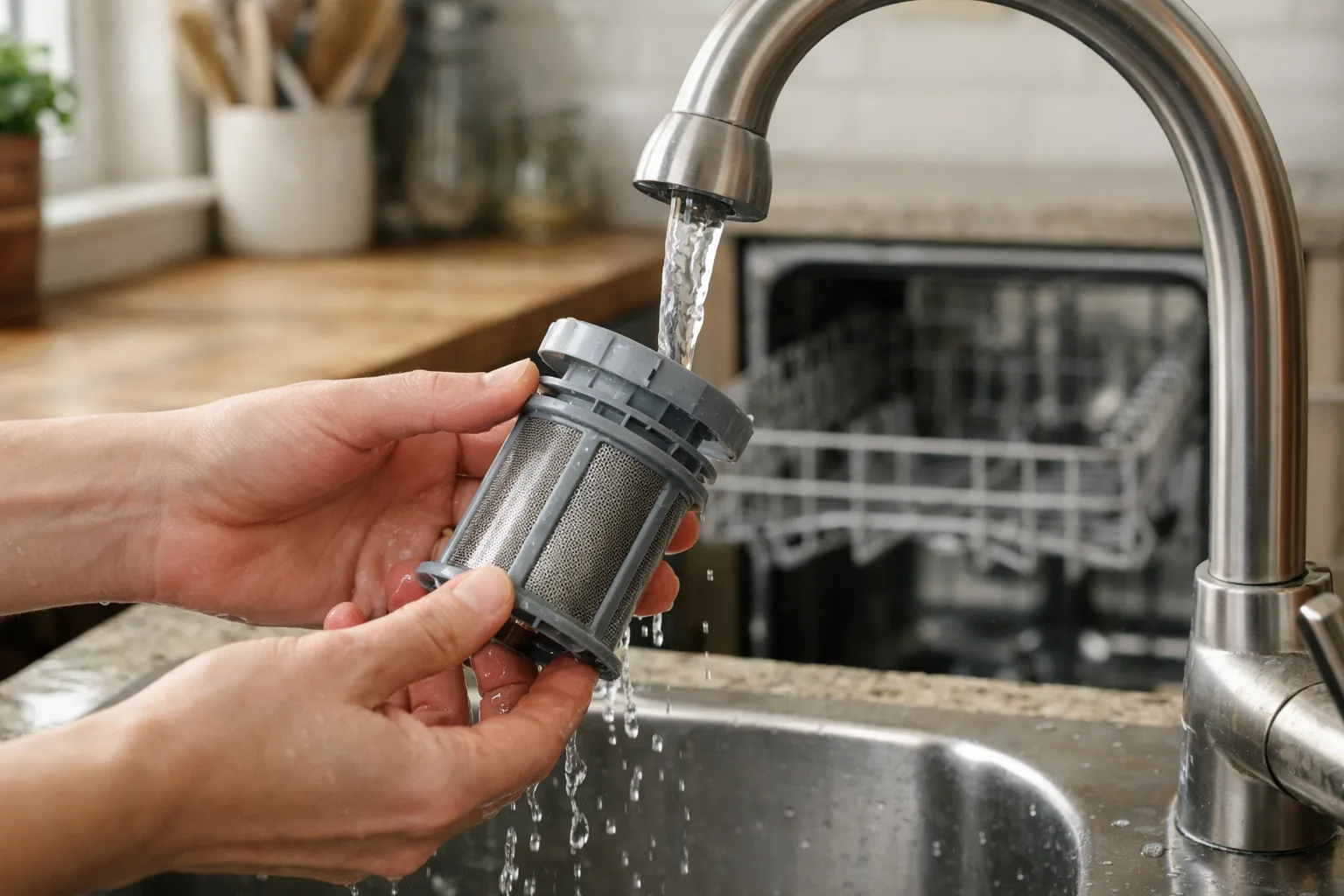
If dishes come out with food specks, grit, or a cloudy film, the dishwasher filter is a good place to start. It catches food particles so they don’t circulate back onto dishes or clog the drain. When it’s dirty, water may not flow as well, and the dishwasher can struggle to clean effectively.
Most removable filters are easy to rinse at a sink, though their location and design vary by model. Check your owner’s manual before taking anything apart. Here’s how to clean the filter safely, and what else to inspect if dirty dishes persist.
Find out what kind of filter your dishwasher has
Many modern dishwashers have a removable filter near the bottom of the tub, usually beneath the lower rack. It may look like a round mesh cylinder, a flat screen, or two parts that fit together. Some models use a twist-lock filter; others release with a small turn or lift.
Not every dishwasher has a user-removable filter. Some older machines use a self-cleaning system instead, and other models have parts that should only be serviced according to the manufacturer’s instructions. Look up the model number—often printed along the inside edge of the door—in the manual or on the manufacturer’s website. Don’t force a filter that won’t turn or lift.
How to clean a dishwasher filter
- Switch the dishwasher off and empty it. Wait until a recent cycle has cooled. Pull out the lower rack to reach the bottom of the tub; you may need to remove the upper rack too if the manual says so.
- Locate and remove the filter. Turn or lift it as directed. If it has separate mesh and screen sections, note how they fit together. A quick photo can help you put the pieces back correctly.
- Clear loose debris. Tip food scraps into the trash, not the sink. Rinse the filter under warm running water. For stuck-on residue, use a soft toothbrush or other soft brush with a little dish soap.
- Rinse thoroughly. Make sure the mesh is clear and free of suds. Avoid wire brushes, scouring pads, and abrasive cleaners, which can damage the filter. Don’t use harsh chemicals or mix cleaning products.
- Check the area beneath the filter. Wipe away loose debris you can see and reach easily with a damp cloth. Be cautious: small sharp pieces of glass may be hidden there. Don’t reach blindly into the sump or remove pump parts unless the manual specifically explains how.
- Reinstall the filter. Fit all pieces back in the correct order and turn or press the filter until it is firmly locked. A loose or incorrectly seated filter can let debris circulate through the dishwasher.
- Replace the rack and run a cycle. If you used soap to clean the filter, rinse it well first. Run the next load as usual and see whether the dishes come out cleaner.
How often should you clean it?
Follow the schedule in your dishwasher’s manual. How often the filter needs attention depends on the model, how frequently you run the machine, and how much food is left on the dishes. If you use the dishwasher often or notice scraps collecting, inspect the filter regularly and clean it when it looks dirty.
Scraping large food scraps into the trash before loading can reduce buildup. You generally don’t need to pre-rinse every dish: modern detergents and dishwasher cycles are designed to work with some food soil, though appliance and detergent guidance can differ. Remove bones, seeds, and other large debris, and check the manual for any loading advice specific to your model.
If dishes are still dirty after cleaning
A clean filter is a sensible first fix, but it isn’t the only reason a dishwasher may leave residue. Check these common trouble spots:
- Spray arms: Food particles or mineral deposits can block the small holes. With the dishwasher off, inspect the arms and clean them as the manual directs. They should be able to rotate freely when the racks are loaded.
- Loading: Large plates, pans, or utensils can block spray arms or prevent water from reaching other items. Arrange dishes so water can reach their surfaces, and avoid nesting bowls or stacking items closely together.
- Detergent: Use detergent made for automatic dishwashers, and follow the package directions. Hand dishwashing liquid creates suds and should not go in the detergent dispenser.
- Water temperature and supply: Water that is not hot enough can affect cleaning. Check the appliance manual for the recommended conditions, and make sure the dishwasher’s water supply is not shut off or restricted.
- Drainage: Standing water, a drain warning, or a persistent bad smell may suggest a drainage problem beyond a dirty filter. Check the manual for basic checks, and arrange service if the issue continues.
If you’ve cleaned and correctly reinstalled the filter but the dishwasher still leaves food behind, consult the troubleshooting section of the manual. Persistent problems may need a repair rather than repeated filter cleaning.
A small maintenance task with a visible payoff
The filter is easy to overlook because it sits out of sight beneath the rack. But it has an important job: keeping captured debris from being swept back onto dishes. A quick inspection and gentle cleaning, done as often as your machine needs, can help the dishwasher work as intended—and make it easier to spot a different problem before it becomes a bigger nuisance.
You might also like
How to Clean a Coffee Maker When Mineral Scale Builds Up
White, chalky buildup can slow a coffee maker and affect your brew. Learn how to descale it safely, rinse it well, and help prevent scale from returning.
How to Clean a Humidifier and Stop Mineral Buildup
Clean your humidifier regularly to remove scale and reduce residue. Learn how to descale it safely, care for filters and prevent mineral buildup.
How to Store Potatoes So They Sprout More Slowly
Keep potatoes cool, dark, dry and well ventilated to slow sprouting. Learn which containers work, where to store them and what to avoid.